Here from our email? To get your free preview, reply “yes” to it from your company's own address. We copy only the public pages named in the email, into a private preview at an unlisted link that's deleted after 7 days unless you subscribe. No card, and no export needed. Separately, our AI agents' copies of the public pages they read are kept until you ask us to delete them (just reply). A yes confirms you're involved with your company and allowed to ask, that your company runs that Confluence site and may let us copy it, and accepts our Free Preview Terms. Not yours? Pass it on: whoever runs it can forward it to aaron@tablewide.com with “yes” at the top, from your company's address.If you look after your Confluence, reply “me” to it, or email “me” to aaron@tablewide.com from your work address, and we'll send one email on what moving involves. Not you? Please forward it to whoever does; they can write to aaron@tablewide.com (Aaron Vontell, Tablewide's founder).Reply to it with any question, or with “yes” if it offered you a preview (a yes accepts our Free Preview Terms). We answer within one business day.
One price for the whole table
Your team wiki, one flat price. We move you off Confluence for free.
Hosted Docmost, the open source wiki with a Notion-style editor and diagrams built in. Everyone signs in with a Google account, and adding a person never changes the bill.
Confluence Data Center ends March 28, 2029. Atlassian's migration page
See it
A real wiki, not a mockup
These are pages from our public sample wiki for Pinecrest Outfitters, a made-up outdoor store. Click around it yourself, no sign-up needed. The header says Docmost because that's the wiki we run for you.
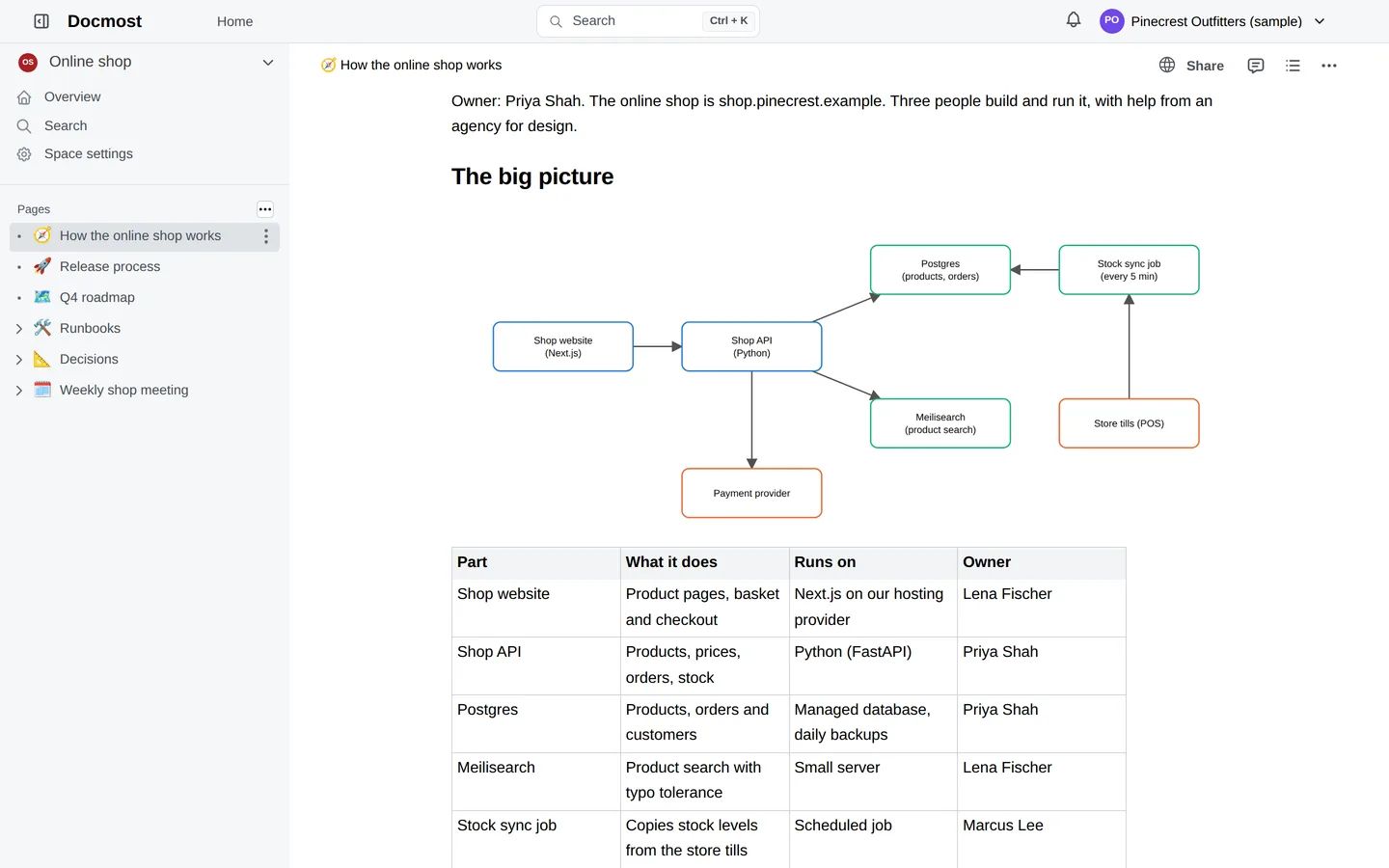
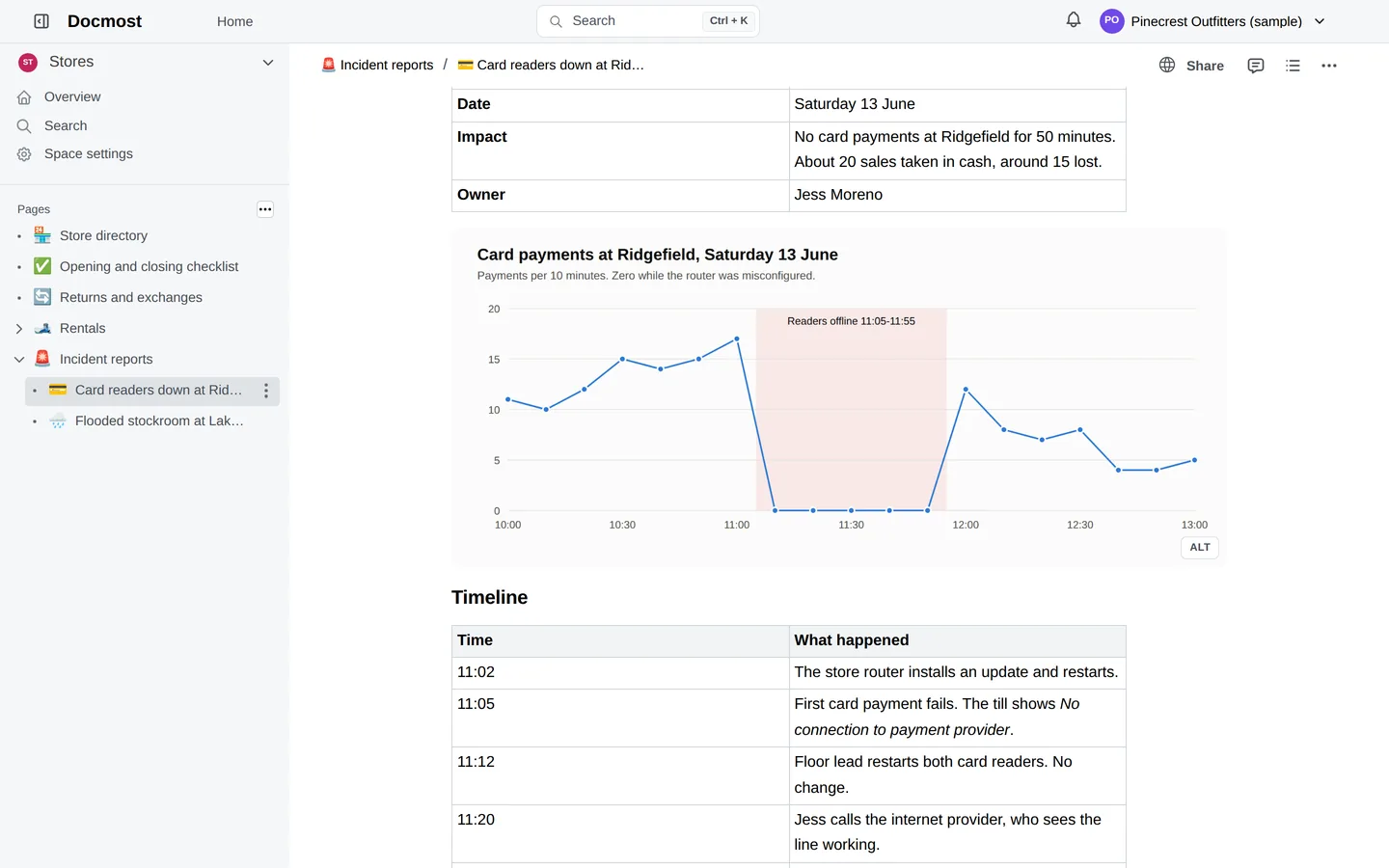
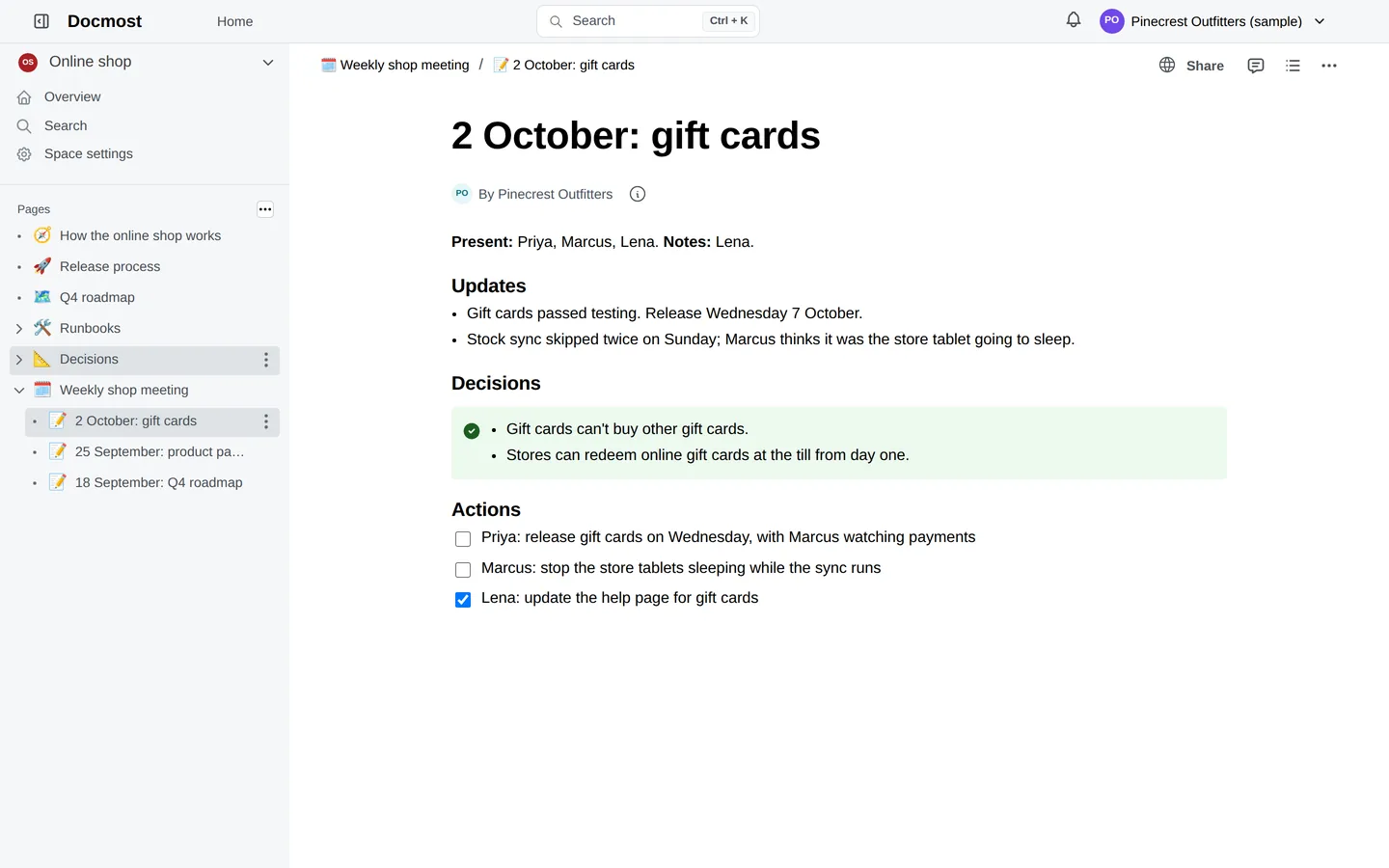
Google Workspace teams outside the EEA, UK and Switzerland can upload one of their own Confluence spaces like this; everyone else starts with a short form. Whichever route you're on, see how a free preview works. Where we can offer one, it covers one space, is private, needs no card, and is deleted after 7 days unless you subscribe.
Included on every plan
Everything your team writes down, in one place.
Wiki
Spaces and a page tree
A slash-menu editor that feels like Notion or Confluence Cloud, with live co-editing, comments, page history and search. Access is set per space.
Diagrams
Draw.io diagrams inside any page
Architecture sketches, org charts and flowcharts live next to the text that explains them. No separate diagram subscription.
Sign-in
Your Google account
No wiki passwords. Workspace members: remove or suspend them in Google Admin. Everyone else: remove their address under Sharing and guests. No SSO surcharge.
Backups
Nightly, kept for about 30 days
Hosted in the US. EU hosting isn't live yet; ask and we'll confirm in writing whether and when. Your data stays in the US, and you can export everything whenever you like.
Pricing
One price for the whole company. Unlimited users on every plan.
Plans differ by storage and features, never by headcount.
Team
For one team moving off a per-seat wiki.
- Unlimited users
- Unlimited spaces
- Wiki with diagrams built in
- 25 GB of storage
- Your own domain
- US hosting
- Sign in with Google
- Nightly backups, kept about 30 days
Business
Most teamsFor companies that publish docs to customers too.
- Unlimited users
- Unlimited spaces
- Everything in Team
- 100 GB of storage
- Public docs site
- API reference pages
Company
For bigger companies with lots of files and a status page for customers.
- Unlimited users
- Unlimited spaces
- Everything in Business
- 500 GB of storage
- Status page included
Status page add-on: $9 USD a month + tax on Team and Business. Plans are for businesses. Prices in US dollars, before sales tax or VAT, which is worked out at checkout. Link, a Stripe service, sells the subscription as merchant of record and handles payment and tax, so your card statement shows LINK.COM* TABLEWIDE.
On any plan, subscribers get their Confluence content moved at no extra charge, on a best-efforts basis: macros and permissions may not carry over exactly (terms). Before you pay, the free preview moves one space.
Nonprofit or open-source project? Half off any plan for as long as you stay. Discounts don't stack: founding nonprofits get half off instead of 40%, plus the price lock. Tick the box in the sign-up form.
Leaving Confluence
We do the move. You check the result.
Atlassian stopped selling new Data Center licences in March 2026 and ends support on March 28, 2029. Cloud prices rose again on October 13, 2026. If you're choosing where to go next, we'll carry your pages over for free. Compare your options, or read how Tablewide stacks up against Confluence Cloud and Notion.
-
You export a space
Confluence's built-in HTML export is enough. Here's how, for Cloud, Server and Data Center.
-
We rebuild it
Page tree, attachments, images and links between pages come across. Comments, page history and permissions don't. Where the export records it, each page opens with a line saying who created and last edited it in Confluence, and when; Docmost itself lists us as the author. We go through the import report with you and list anything that needs a look.
-
You switch when ready
Keep Confluence running until you're happy. Your team signs in with their Google accounts.
Questions
Before you sign up
We use Microsoft 365, not Google. Can we still use it?
Yes, with free Google accounts. There's no Microsoft sign-in, but anyone can make a Google account for their existing work email in a few minutes, with no Gmail address needed. Your admin then adds each address under Sharing and guests in the Tablewide app. If you'd rather have Microsoft sign-in, email support@tablewide.com and tell us, because it helps us decide what to add next.
What's a space?
A space is a top-level section of the wiki with its own members, like a Confluence space. Every plan includes as many spaces as you like, so each team or department can have its own.
Is it really unlimited users?
Yes. Every plan includes as many people as your company has. Plans differ by storage and features.
How is this different from other flat-price wikis?
Most cap users in bands, such as 11 to 100 people, and leave the move to you. Every plan here has unlimited users, and we move your Confluence content for you.
What is Docmost?
Docmost is a modern open source wiki. We run the free Community Edition for you, keep it updated and back it up, and publish our changes to it. Because it's open source, you can always export your spaces and run them yourself. What's included, and what isn't
What about Jira and Trello?
Team boards are the next thing we're adding. Mention them under "Tell us more" when you sign up, and founding teams get a say in how they work.
Where is my data?
In the US (EU hosting isn't live yet), in a database of its own, separate from other customers. See security and data.
Does it have AI features?
The wiki itself has no AI features, and we don't train anything on your content. Behind the scenes, AI agents help us run support and migrations, and the founder signs off on price exceptions, refunds beyond what the terms already guarantee, and anything touching deletion, privacy or security. You can ask us to handle your move or support requests without AI access to your content.
When can we start?
If your work email runs on Google Workspace, you can start a preview right away. Otherwise, ask for a free preview and we'll email you a private upload link, usually within one business day. We aim to have your preview wiki ready within two business days of your upload, on a best-efforts basis. No card needed.
Free preview
See your own pages in Tablewide
Your own Confluence pages (one space) in a private preview wiki. No card. The preview is deleted after 7 days unless you subscribe (our AI agents' working records are the exception; see Before you upload, below).
Which route is yours? Pick one to jump down to it.
Google Workspace, company outside the EEA, UK and Switzerland Everyone else: use the form
In short: if your company is outside the EEA, UK and Switzerland and uses Google Workspace, you can start on your own (have your Confluence export ready first: your 7 days start when you name your wiki). Otherwise use the form (outside the EEA, UK and Switzerland, your 7 days start when we email your upload link, so export your space first); if your company is in the EEA, UK or Switzerland, don't upload an export. Details for each route are below.
Before you upload: what you may share, and what we keep and for how long
Your export holds your company's pages, so check that you're allowed to share them outside the company, including any personal data about people in the EEA, UK or Switzerland. If your organisation is in the EEA, UK or Switzerland, please don't upload an export; we may be able to build your preview from your public pages instead. The preview wiki, any copy we made of your public pages and your export are deleted 7 days after the preview is created, unless you subscribe or we agree in writing to extend it (to no more than 30 days after creation), and you can ask us to delete them sooner at any time at support@tablewide.com. Backup copies roll off within 30 days after deletion. One exception: our AI agents' working records (session histories) keep copies of what they read about your preview: content from your public pages or, if you ask them to look at it, your export, anything you send them, and our own offer and import reports. We have no set deletion schedule for these, so they are kept until we delete them. If you ask at support@tablewide.com, we delete them within 30 days and our AI provider removes them within a further 30 days under its own terms (preview terms, P5; privacy policy, Section 4).
Pick your route:
-
Google Workspace work email, and your company is outside the EEA, UK and Switzerland? Start when your export is ready: sign in with it, name your wiki, and you're usually inside your own private preview within a minute or two. It starts empty. Your 7 days start when you name your wiki; 7 days later the preview and your upload are deleted unless you subscribe. So have your export ready first (how to export a Confluence space), then upload it inside your preview. If the space is already public on your company's Confluence Cloud site, and the site's name matches your email domain (acme.atlassian.net for you@acme.com), you can paste the space's address instead: we copy up to 200 pages, and only what anyone can already read.
Free, no card, and the preview terms apply. Sign-in shares your name, work email, Google account ID, your company's domain and, if you have one, your profile picture (privacy policy). One running preview per company; if yours already has one, or we're at capacity, we'll point you to the form.
-
Microsoft 365, or another work address on your company's own domain? Use the form. Personal addresses at gmail.com, outlook.com and the like can't get a preview, and we may decline or limit previews (for example, one per company). If your company is outside the EEA, UK and Switzerland, we email you a private upload link, usually within one business day, and aim to have your preview ready within two business days of your upload, on a best-efforts basis. Your 7 days start when we send your upload link, even if you open it later, and include the time we take to build the preview; the link page shows the date it's deleted. So export your space before you send the form (how to export a Confluence space). The same free, 7-day preview terms apply. Signing in to the preview uses a Google account; if you don't have one, you can make a free one with your work email.
-
Is your company in the EEA, UK or Switzerland (any work address on its own domain)? Use the form, and don't upload an export: we can't yet offer the data transfer terms one needs, so we'll email you an offer to build your preview from your public pages (our AI agents read those pages to write it, and what they read can stay in their working records with our AI provider; nothing is built on our servers until you say yes), or tell you if that isn't possible.
If we emailed you offering a preview built from your public Confluence pages, reply to that email instead: there's nothing to export, and the same free, 7-day preview terms apply.
What comes across: where the export records it, each page names who wrote it in Confluence, plus who last edited it and when. Comments, page history and permissions don't come across. If we ever close the service, you get at least 60 days' notice and can export everything.
Tablewide is run by its founder, Aaron Vontell, with AI agents doing much of the day-to-day work.
Details: who runs it, founding offer
Who runs it: Tablewide is a small company run from New York by its founder, Aaron Vontell, with AI agents doing much of the day-to-day work. You can always reach us at support@tablewide.com.
Founding offer: First 20 teams: 40% off your first year, and your price locked for as long as you stay.
Thanks. We'll email you, usually within one business day.
If your company is outside the EEA, UK and Switzerland and we can offer you a preview, that email includes a private upload link for your Confluence export; if we can't, the email will say so. Your preview's 7 days start when we email you that link and include the time we take to build it; the preview and your upload are deleted 7 days later unless you subscribe, and the link page shows the date. So you can start your export now (how to export a Confluence space) and upload it soon after the link arrives (if you picked EU hosting, read the note below first). Please don't send exports by email. If your company is in the EEA, UK or Switzerland, please don't upload: we'll offer to build your preview from your public pages (our AI agents read those pages to write it, and what they read can stay in their working records with our AI provider; nothing is built on our servers until you say yes), or tell you if that isn't possible.
You picked EU hosting, which isn't live yet. Please don't upload until we've replied: our servers are in the US, and we'll confirm in writing whether and when we can host in the EU.
The preview needs no card. If you'd like to lock in the founding price now, you can reserve it with a card. You won't be charged until your wiki is live and you've approved the move.
Your founding price is reserved.
Nothing has been charged. We'll email you to plan your move, and you pay only once your wiki is live and you've approved it.